iPhone sound level meter
Decibel Meter for iPhone
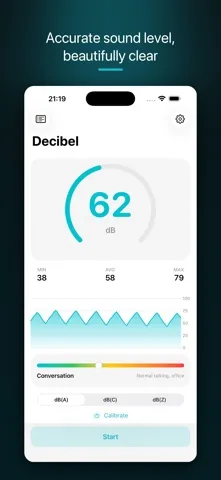
dB Decibel reads the sound level around you in dB(A) in real time, and tells you when the reading cannot be trusted because the room is below the microphone floor or the sound is clipping the mic.
 Free to download. iPhone, iOS 18 or newer. Optional one time Pro unlock, no subscription, no tracking.
The bands the app uses to label a reading, in dB(A): Calm from 0, Quiet from 30, Conversation from 50, Busy street from 70, Loud from 90, Concert from 100.
On screen
What you actually see
The difference
Two readings a meter should refuse to give
Most of what separates a useful meter from a decorative one is knowing when to stop showing a number. dB Decibel checks both ends of the microphone's range on every buffer.
Bottom of the range
Below the microphone floor
An iPhone microphone has a noise floor near minus 55 dBFS. Under that it is measuring its own electronics, not your room. That is why a silent bedroom so often reads 50 to 60 dB in other apps.
dB Decibel compares the level against that floor mapped through your calibration, plus a 3 dB margin, and reports near silence rather than a number it cannot support.
Top of the range
Clipping the microphone
When a sound is louder than the microphone can represent, the waveform is cut flat and every level computed from it is too low. A meter that keeps counting simply under reports the loudest moment you cared about.
dB Decibel watches the peak sample of each audio buffer and raises a clipping flag once three buffers in a row sit at or above 0.99 of full scale.
What this app is not. Readings are approximate (±dB) and come from an uncalibrated phone microphone. dB Decibel is an environmental sound measurement tool. It is not a certified sound level meter, not a dosimeter, not hearing protection and not a medical device, and it is not suitable for occupational, regulatory or legal compliance. That wording is taken from the disclaimers inside the app itself.
What it measures
A working meter before you pay anything
Free, in every install
- Live dB(A) sound level with peak hold.
- Near silence and clipping flags on every reading.
- Leq, L10 and L90: the energy average, the loud tail and the background level.
- Minimum, average and maximum, dominant frequency and a live graph.
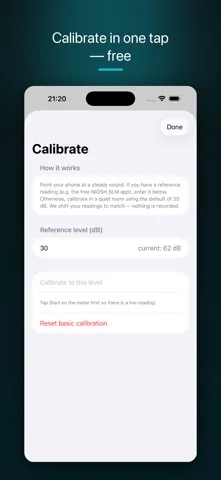
- One tap guided calibration. Accuracy is the whole point, so it is not behind the paywall.
- A safe listening time estimate, informational only, and the labeled reference scale.
- Start and stop from Siri, the Action Button and Control Center. Detection of an external microphone.
- A banner ad. Pro removes it.
Pro, one time purchase
- Evidence Mode: a timestamped noise event log with a PDF and a CSV you can hand to a landlord or an association.
- Exposure figures: LAeq, an 8 hour time weighted average and a daily dose percentage. Informational, not a dosimeter.
- A, C and Z frequency weighting built from the IEC 61672 filter specification.
- Octave band analysis from 31.5 Hz to 16 kHz, a real time spectrum analyzer and a test tone generator.
- Live Sound ID, using Apple's on device sound classifier. Audio still never leaves the phone.
- Sleep Soundscape: an overnight room noise timeline with a morning summary.
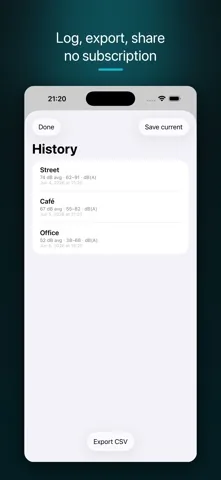
- Session history with auto save, loud level alerts, a Live Activity and widgets, fine calibration trim and per input trim for external and Bluetooth microphones.
- No ads.
Pro is a single non consumable purchase, not a subscription. The App Store shows the price in your own currency.
Why people measure
Pick the situation you are in
Each of these needs a different number out of the same microphone. The guides below say which one, and where a phone stops being the right tool.
Questions
Frequently asked
How accurate is an iPhone as a decibel meter?
Treat every reading as approximate. dB Decibel converts the microphone level in dBFS to a sound pressure level in dB by adding a calibration offset, and the app ships with a measured offset per iPhone model plus a free guided calibration step you run yourself. That is good enough to compare rooms, times of day and noise sources. It is not good enough for a legal, occupational or medical measurement, and the app says so on the meter screen. For those, use a certified Class 1 or Class 2 sound level meter.
What does the near silence flag mean?
An iPhone microphone has a noise floor of its own, near minus 55 dBFS. Below that the microphone is measuring itself, not the room. Many meters keep printing a number anyway, which is why a silent bedroom often shows 50 to 60 dB. dB Decibel compares the reading against the microphone floor plus a 3 dB margin and reports near silence instead of a number it cannot stand behind.
Why does the app say a sound is clipping?
Clipping means the sound is louder than the microphone can represent, so the waveform is cut flat at full scale. Any level shown from a clipped signal is an under reading. dB Decibel watches the peak sample of every audio buffer and reports clipping once three buffers in a row sit at or above 0.99 of full scale. This happens in front of a speaker stack, next to power tools and close to a siren.
Can I use dB Decibel for a noise complaint or in court?
You can use it to build a record. Evidence Mode logs timestamped events with their peak level and duration and exports a PDF and a CSV, which is what a landlord, a housing association or a council usually asks for. What it cannot do is stand in for a certified measurement. Every exported report carries a footer saying the readings are approximate, taken with an uncalibrated phone microphone, and not for occupational, regulatory or medical use. Do not present it as a certified measurement.
What are Leq, L10 and L90?
Leq is the energy equivalent continuous level: the steady level that carries the same sound energy as the varying one you measured. L10 is the level exceeded 10 percent of the time, which describes the loud peaks. L90 is the level exceeded 90 percent of the time, which describes the background the peaks sit on. dB Decibel computes all three from the level series, and they are in the free version.
Is dB Decibel free?
The app is free to download and the free version is a working meter: live dB(A) with peak hold, the near silence and clipping flags, Leq, L10 and L90, min, average and maximum, the live graph, the reference scale and the guided calibration. The free version shows a banner ad. Pro is a single one time purchase, never a subscription, and it adds Evidence Mode, exposure figures, octave bands, the spectrum analyzer, A, C and Z weighting, session history, external microphone trim, and it removes the ads. The App Store shows the price in your own currency.
Does the app record or upload my audio?
No. Sound is analyzed live on the device and discarded. Nothing is written to disk, nothing is sent to a server, and there is no account. Even the Pro sound identification runs on the device using Apple's built in sound classifier. Evidence Mode logs sound levels and timestamps only, never audio.
Get the app
Measure the room, and know what the number is worth
Free to download, works with no connection, no account and no tracking. Audio is never recorded or sent. If you later want the noise log, the exposure figures or the octave bands, Pro is a single purchase you keep.
iPhone, iOS 18 or newer. Version 1.3.0.